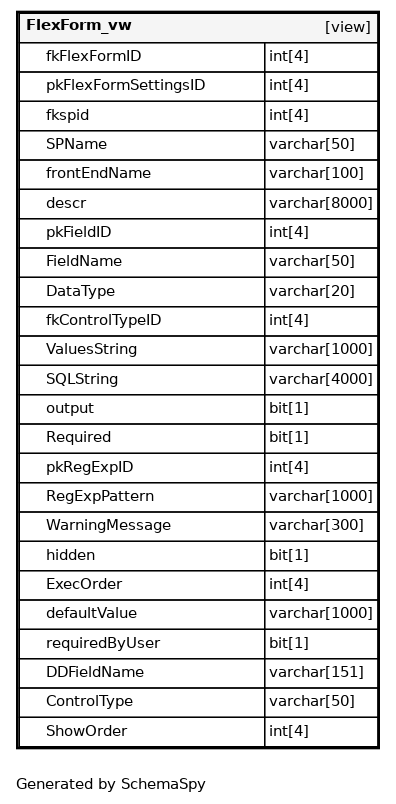
Columns
| Column | Type | Size | Nulls | Auto | Default | Children | Parents | Comments |
|---|---|---|---|---|---|---|---|---|
| fkFlexFormID | int | 4 | null |
|
|
Flex form reference - Links to the flexible form definition |
||
| pkFlexFormSettingsID | int | 4 | null |
|
|
Form settings identifier - Primary key for the form field settings |
||
| fkspid | int | 4 | null |
|
|
Stored procedure reference - Links to stored procedure for data processing |
||
| SPName | varchar | 50 | √ | null |
|
|
Stored procedure name - Name of the stored procedure for field processing |
|
| frontEndName | varchar | 100 | √ | null |
|
|
Frontend display name - User-friendly name displayed in the interface |
|
| descr | varchar | 8000 | √ | null |
|
|
Field description - Detailed description of the field’s purpose and usage |
|
| pkFieldID | int | 4 | √ | null |
|
|
Field identifier - Primary key for the field definition |
|
| FieldName | varchar | 50 | √ | null |
|
|
Field name - Internal name of the form field |
|
| DataType | varchar | 20 | √ | null |
|
|
Data type - Data type specification for the field (text, number, date, etc.) |
|
| fkControlTypeID | int | 4 | √ | null |
|
|
Control type reference - Links to the UI control type for this field |
|
| ValuesString | varchar | 1000 | √ | null |
|
|
Values string - Predefined values or options for the field |
|
| SQLString | varchar | 4000 | √ | null |
|
|
SQL string - SQL query for populating field options dynamically |
|
| output | bit | 1 | √ | null |
|
|
Output flag - Boolean indicating if this field is included in output |
|
| Required | bit | 1 | √ | null |
|
|
Required flag - Boolean indicating if this field is mandatory |
|
| pkRegExpID | int | 4 | √ | null |
|
|
Regular expression reference - Links to validation pattern for the field |
|
| RegExpPattern | varchar | 1000 | √ | null |
|
|
Validation pattern - Regular expression pattern for field validation |
|
| WarningMessage | varchar | 300 | √ | null |
|
|
Warning message - Message displayed when validation fails |
|
| bit | 1 | √ | null |
|
|
Hidden flag - Boolean indicating if the field is hidden from users |
||
| ExecOrder | int | 4 | √ | null |
|
|
Execution order - Order in which stored procedures are executed |
|
| defaultValue | varchar | 1000 | √ | null |
|
|
Default value - Default value assigned to the field |
|
| requiredByUser | bit | 1 | √ | null |
|
|
User required flag - Boolean indicating if field is required by user configuration |
|
| DDFieldName | varchar | 151 | √ | null |
|
|
Data dictionary field name - Field name from data dictionary or custom name |
|
| ControlType | varchar | 50 | √ | null |
|
|
Control type name - Name of the UI control type (textbox, dropdown, etc.) |
|
| ShowOrder | int | 4 | √ | null |
|
|
Display order - Order for displaying fields in the form |
Relationships
Close relationships within degrees of separation